






Chapter 7
The best user interview tools for remote UX research


TL;DR
User interview tools streamline your interview and analysis process, enabling you to speak with users, collect valuable insights, and gain a deeper understanding of user behaviors faster.
These solutions typically facilitate key interview processes, such as participant recruitment, automated transcription, interview analysis, and research reporting. If you want an AI-first, end-to-end UX research platform that runs interviews alongside usability tests and surveys, Maze is a great option. Other options include Dscout for structured 1:1 interviews plus diary-style studies, or Albus Research for turning interview transcripts into structured themes and reports with AI-led analysis.
User interviews are a very accessible research method—it’s part of why they’re so valuable. In their simplest form, they require little more than a pen, some paper, and an inquisitive mind.
However, one thing's for sure—a user interview tool makes user interviews a whole lot easier, especially when done at scale. From organizing participants, automating admin tasks, and recording interviews to generating transcripts, analyzing conversations, and creating reports—a great selection of user interview tools can take your interviews to the next level.
We reviewed the best options for your shortlist and put them head-to-head below, so you can quickly find the right tool for your user interview process.
Why do you need a user interview tool?
A good tool can streamline the process of conducting user interviews and bring objectivity to your UX research. It enables you to move with speed and precision by effortlessly scheduling interviews, organizing responses, and analyzing data. These tools also cut down on manual tasks to maximize productivity and speed up the user research process.
Besides these core benefits, here are a few other reasons you need a user interview tool:
- Minimize interviewer bias: User interview tools standardize the interview process and create more consistency in how you collect information. You can maintain a higher degree of objectivity and avoid influencing users' responses with cognitive biases.
- Remote participant access: User testing tools allow you to connect with participants across different geographies and maximize diversity in your research. This will enhance the cultural context to understand how people use your product in different parts of the world. Remote user research also makes your interview process more accessible for users with disabilities who would prefer to connect from home.
- Capture and annotate multimedia: You can capture audio and video recordings of your interviews, then annotate and analyze these multimedia assets to extract customer insights. Storing these assets in your user interview tool account means you can revisit them anytime in the future.
- Faster analysis: AI-powered transcription, auto-tagging, and search make it much quicker to review interviews, pull quotes, and spot themes across sessions.
- Easier research referencing: Centralized storage for recordings, transcripts, clips, and notes makes past interviews easier to find and re-check when you plan new studies or revisit a decision, while still validating insights as your product and users change.
- Shared understanding of user needs: Many user interview tools offer strong collaboration capabilities, with centralized storage and shared reports making it easier to educate your entire team about user expectations. You’re better equipped to work in a cross-functional setup and collaboratively build your product strategy.
You can also integrate several tools to interview users with your user research repositories or qualitative data analysis tools. This works well for synthesizing customer feedback from different studies to deepen your understanding of user behaviors.
Top 9 user interview tools
Here’s an overview of the nine top user interview software we’ve shortlisted and reviewed.
|
Feature |
Maze |
Zoom |
Hotjar Engage |
Optimal Workshop |
Lookback |
Dscout |
Lyssna |
Albus Research |
Hubble |
|
AI transcription |
✅ |
✅ |
✅ |
✅ |
❌ |
✅ |
✅ |
✅ |
✅ |
|
AI-moderated interviews |
✅ |
❌ |
❌ |
❌ |
❌ |
❌ |
❌ |
❌ |
✅ |
|
Analyze interviews |
✅ |
❌ |
✅ |
✅ |
✅ |
✅ |
✅ |
✅ |
✅ |
|
Automated reports |
✅ |
❌ |
❌ |
❌ |
❌ |
✅ |
✅ |
✅ |
✅ |
|
Share insights |
✅ |
✅ |
✅ |
✅ |
✅ |
✅ |
✅ |
✅ |
✅ |
|
Participant panel |
✅ |
❌ |
✅ |
❌ |
❌ |
✅ |
✅ |
❌ |
❌ |
|
Recruit own users |
✅ |
❌ |
✅ |
❌ |
✅ |
✅ |
✅ |
❌ |
❌ |
|
Interview scheduling |
✅ |
✅ |
✅ |
❌ |
✅ |
✅ |
✅ |
❌ |
✅ |
|
Integration with video conferencing apps |
✅ |
❌ |
❌ |
❌ |
❌ |
❌ |
✅ |
❌ |
❌ |
|
Conduct interviews natively in app |
✅ |
✅ |
✅ |
❌ |
✅ |
✅ |
❌ |
❌ |
❌ |


1. Maze

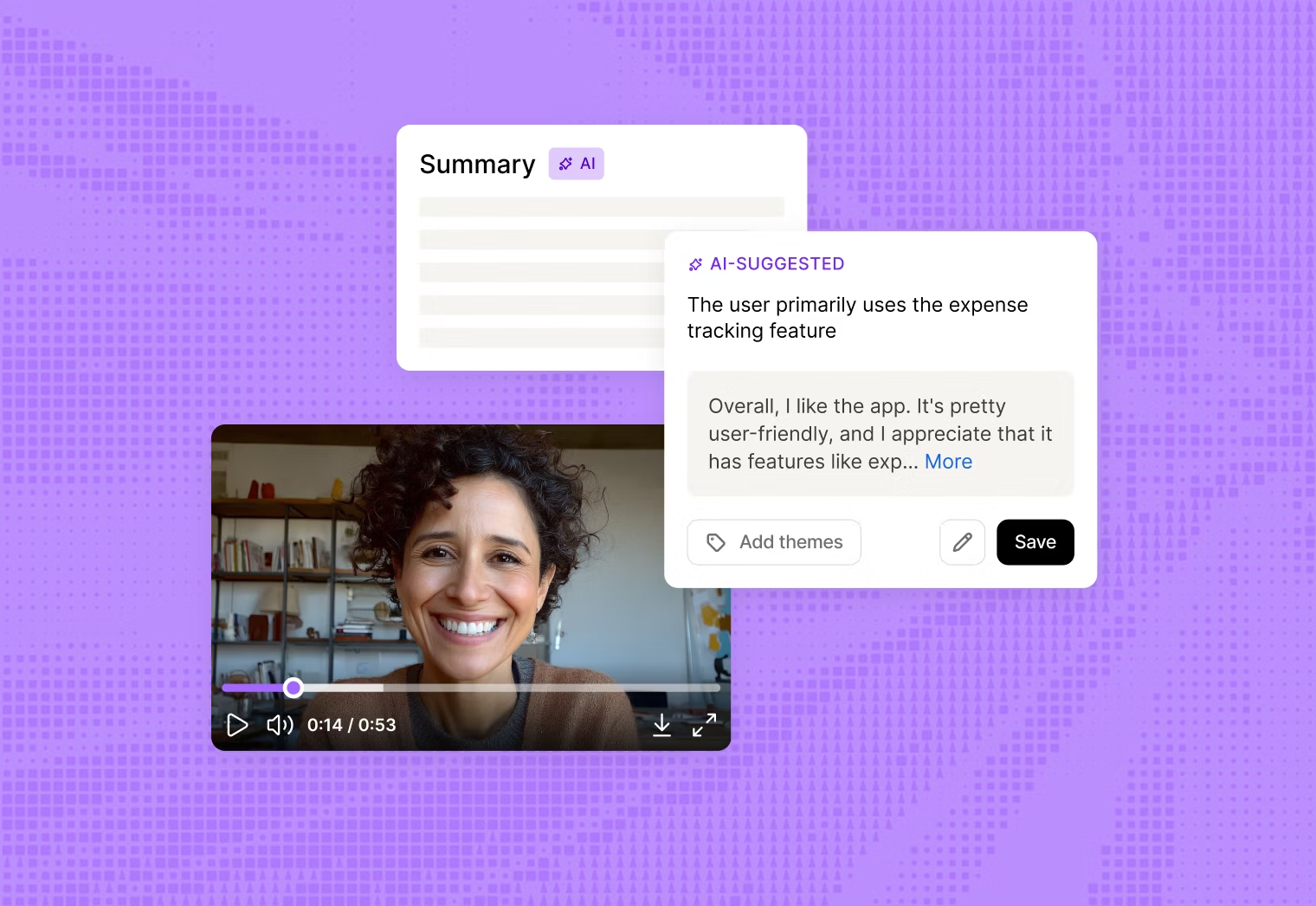
Maze is an AI-first user research platform offering a suite of tools to conduct end-to-end product research, from interviews and UX surveys to usability testing and prototype testing. It enables strategic decision-making for UX design and development and helps build an airtight research ops setup.
The Maze Panel enables you to recruit your own users for research studies, or filter and choose from its database of over six million real users from 130+ countries. You can then keep track of participants from existing and previous research projects in the platform’s purpose-built UX-focused CRM, Reach.
While it’s an all-in-one solution for planning and managing interviews effortlessly, Maze also offers an AI moderator that can lead structured interviews for you, ask follow-up questions, and keep sessions consistent across participants and time zones. Once interviews are complete, Maze AI supports analysis with thematic clustering to surface key themes and user quotes, highlight important moments, save reusable clips, and generate research reports you can share with your team.
Key features
- Recruit participants in a snap: Find your ideal research participants for any research study from Maze Panel with six million pre-screened participants.
- Manage respondents: Whether you bring your own users to the interview table or recruit participants using Maze Panel, manage all communications effortlessly with Reach
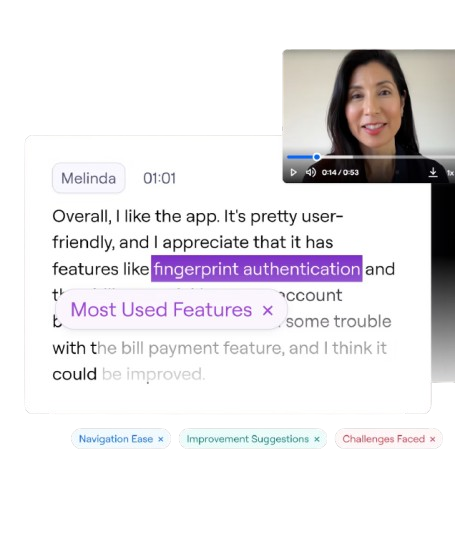
- Transcribe interviews effortlessly: Capture the entire recording of your conversation and get AI-generated transcriptions and key highlights upon completing the interview
- AI for moderated studies: Run fully automated interviews with dynamic probing, real-time adaptation, and built-in reporting
- Analyze & extract insights with AI: Identify major patterns and trends in your interviews and bucket them under different themes
- Generate ready-to-share reports: Create comprehensive, visual-rich reports with accurate insights from your entire study then share them with anyone, anywhere
- Integrate into your existing workflows: Conducting user interviews with Maze won’t become a blocker in your current process—easily integrate with calendar and video conferencing tools to streamline your workflows
- Run extensive research studies: Beyond user interview tools, Maze also offers solutions for usability testing, prototype testing (including AI prototypes!), UX surveys, card sorting, tree testing, and more
Plus, Maze Clips helps you turn any usability tests into unmoderated interviews by capturing video and audio recordings from test participants. It’s a quick and easy way to get additional qualitative insights from users without needing to schedule follow-up interviews.
Pricing
Maze offers pricing options for organizations and product teams of all sizes:
Free | Enterprise |
|---|---|
$0/month | Custom pricing |
- 1 study per month - 5 seats - Essential prototype testing - Surveys - Pay-per-use panel credits | - Custom study quantities - Unlimited seats - Access to 3M+ global panel (or bring your own for free) - Moderated interviews - AI-moderated interviews - Prototype testing - Surveys - Card sorting & tree testing - Mobile experience testing - Audio, video & screen recording - All Maze AI features - Automated analysis & presentation-ready reports - Enterprise security & controls - Priority support, dedicated CSM & research partner access |
2. Zoom

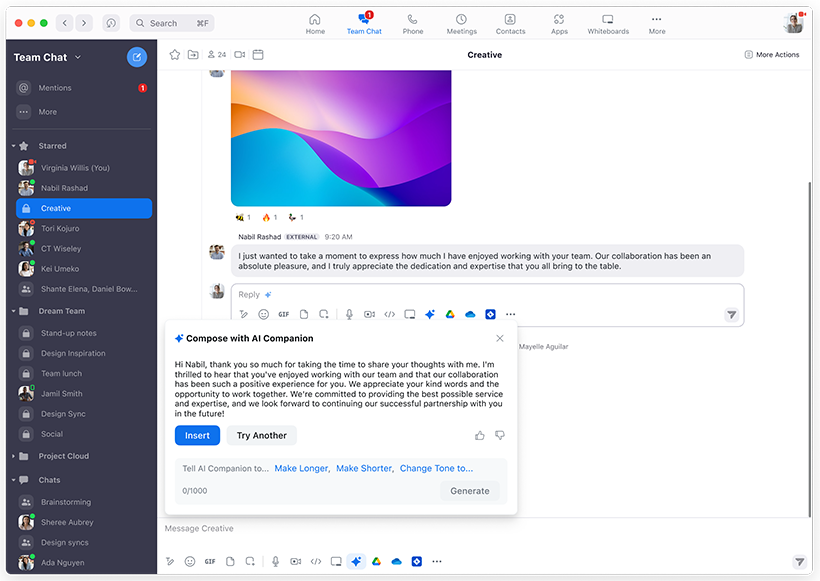
Zoom is a popular video conferencing tool that doubles as a user interview tool for many UX teams. While its primary use case is remote collaboration, you can also use the app to speak with users in a remote interview setup.
The built-in chat function allows interviewers to interact with participants before and after the interview to share relevant information. It also offers multi-language captioning and translations for interviewing a global audience. Plus, built-in transcription and AI Companion features summarize calls and highlight key topics and action items. Recordings, transcripts, and summaries are stored in the Zoom cloud and can be exported or passed into other tools via integrations and APIs.
Key features
- Ease of scheduling: Schedule interview meetings directly from Gmail, Outlook, or iCalendar
- HD video and audio quality: You’ll like Zoom if you want to record high-quality media for your UX research
- Highly secure environment: Zoom also brings high security with password protection, role-based security, and waiting rooms
- Communicate with large groups: Chat with a large group of people and search within your chats to find relevant insights
Pricing
Basic | Workplace Pro | Workplace Business | Workplace Enterprise |
|---|---|---|---|
$0/month | $16.99/user/month | $21.99/user/month | Custom pricing |
- 40-minute meetings - 100 participants per meeting - Limited AI Companion in meetings - Team Chat for instant messaging - 3 editable whiteboards - Share up to 10 docs - 5 two-minute clips - Connect Gmail or Outlook in Zoom - Sync Google or Microsoft calendars - Tasks and Hub for basic file access | All Basic features, plus: - Meetings up to 30 hours - 100 participants per meeting (can increase with Large Meeting add-on) - Unlimited AI Companion use in meetings and on the web - Unlimited docs and clips - Custom avatars (3 minutes per month) - Zoom Mail and Zoom Calendar - 10 GB cloud storage for recordings and files - Live chat support | All Pro features, plus:
- 300 participants per meeting (can increase with Large Meeting add-on) - Scheduler so others can book time with you - Unlimited whiteboards - SSO and managed domains - Multi-region storage and media control - Device management - Information barriers - Archival and data loss prevention APIs | All Business features, plus: - 1000 participants per meeting - Zoom Phone (full-featured PBX) - Webinars for 500 attendees - Zoom Rooms - Workspace Reservation - Visitor Management - Translated captions |
3. Hotjar Engage

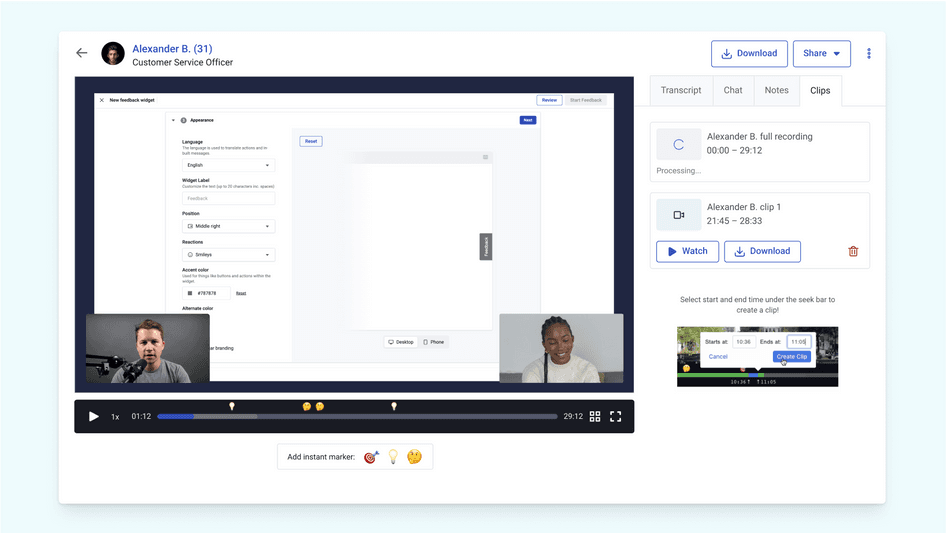
Hotjar Engage is a part of Hotjar’s suite of tools for understanding user behavior. With Engage, you can recruit participants for your research studies, schedule interviews, and analyze user feedback sessions.
Hotjar provides a pool of 200,000+ testers from which you can recruit participants for your UX research. Once recruited, you can use the tool to efficiently manage their activities and incentives. Hotjar records the interview, generates AI transcripts, and lets you create and share clips so stakeholders can review key moments without watching the full recording.
Besides interviews, you can also rewatch session recordings, see heatmaps, and conduct A/B testing to closely monitor user behavior.
Key features
- Built-in video hosting: Conduct video interviews within Hotjar and extract short clips from your research report
- Multilingual transcripts: Transcribe a session in multiple languages to facilitate international user interviews
- Add notes to analyze sessions: Document your thoughts and add notes during the interview
- Invite moderators and observers: Add more moderators to steer the discussion or include multiple stakeholders as observers
Pricing
Free | Growth | Pro | Enterprise |
|---|---|---|---|
$0/month | $49/month | Custom pricing | Custom pricing |
- Up to 200k monthly sessions - Session replay & unlimited heatmaps - Funnels - Standard filters - 7 integrations - Dashboards | Everything in Free, plus: - Starting at 7k monthly sessions - Sense (AI insights) - 13 months data access - Zone-based heatmaps - Journey analysis - Impact quantification - 9 integrations | Everything in Growth, plus: - Starting at 1M monthly sessions - Multi-session replay summaries - Zone-based heatmaps with revenue metrics - Revenue goals & tracking - Precision & retroactive filtering - 115+ integrations | Everything in Pro, plus: - Digital experience monitoring - User lifecycle extension - Error summaries - Data feeds - Unlimited projects |
4. Optimal Workshop

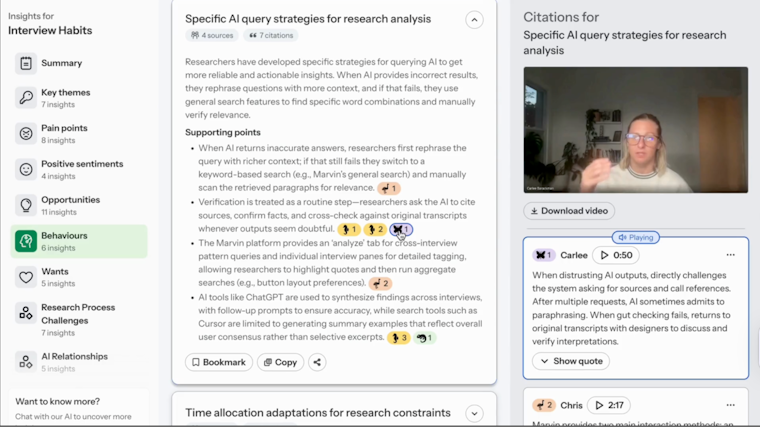
Optimal Workshop supports user interviews through Optimal Interviews, a dedicated analysis tool that sits alongside its other UX research solutions. Once you upload your interview videos, AI automatically highlights key themes, pain points, and opportunities. You can also ‘chat’ with the data to ask follow-up questions backed by real clips.
The tool generates transcripts, highlight reels, and downloadable video snippets so you can share with stakeholders. It’s important to note that Optimal Interviews is designed only for working with recorded interviews—it doesn’t host or run the live interview sessions itself.
Key features
- Recruit from a participant panel: You can find the research participants for your research from Reframer’s pool of participants
- Tagging and segmentation: Set up tags and segments before interviewing users to pull user quotes or insights under specific themes
- Invite guest notetakers: Add people to your study as collaborators to take notes
- Multiple analysis methods: Analyze interviews using various methods, such as affinity mapping and thematic analysis
Pricing
Starter | Enterprise |
|---|---|
$199/month billed annually | Custom pricing |
- 5 studies launched per year - Unlimited seats - Unlimited participant responses per study - All tools and study types - AI-powered analytics and insights - SOC II/GDPR compliance | - Custom study bundles - Unlimited seats - Unlimited participant responses per study - All research tools and study types - Enterprise-grade security - Multiple workspaces and private projects - Administrator controls - Usage reports - Dedicated onboarding and setup - Dedicated Customer Success Manager |
5. Lookback

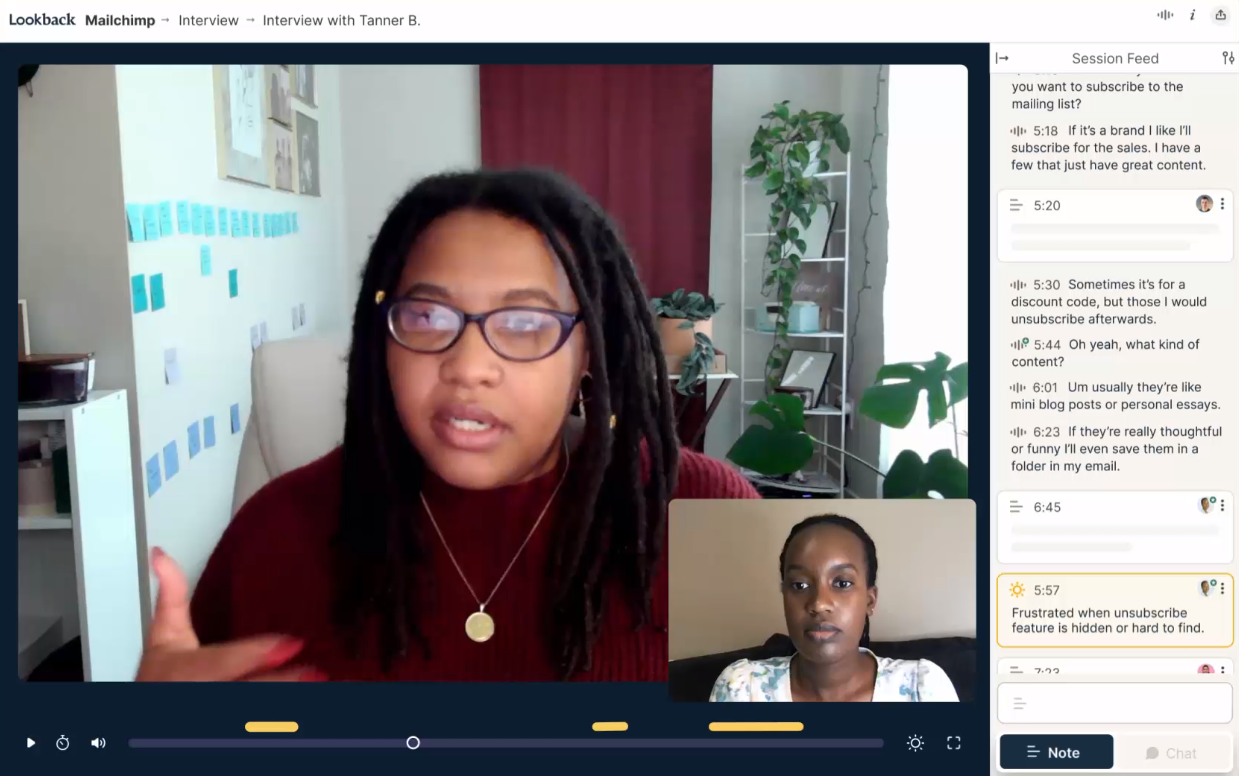
Lookback is a qualitative research tool that allows you to conduct user interviews across desktop and mobile (via its Participate app). The tool’s native video conferencing platform records and saves all your sessions on the cloud so you can access them anywhere. Stakeholders can sit in a virtual ‘observation room,' watching sessions live and chatting with the moderator without being visible to participants, so the interview feels natural.
The interview player is designed for real-time note-taking or creating timestamped notes when you’re analyzing your remote user research data.
Key features
- Easily share insights: Share a research study using a link or add people to your team and collaborate with them on interview analysis
- Access session recordings: Session recordings are directly uploaded to the cloud, so you can access them later
- Recruit & manage participants: Lookback integrates with User Interviews to help you find research participants from a global panel
Pricing
Freelance | Team | Insights Hub | Enterprise |
|---|---|---|---|
$299/year | $1,782/year | $4,122/year | Custom pricing |
- 10 sessions (moderated or unmoderated) - Add 10-session packages for $299/package ($29.90 per session) - 1 panel participant included - Bring your own participants for free - Pay-as-you-go panel participants: $49 each - All core features - 1 solo seat - Unlimited guests - Chat support | - 100 moderated sessions - Add 10-session packages for $178/package ($17.80 per moderated session) - Unlimited unmoderated sessions - 10 panel participants included - Bring your own participants for free - Additional panel participants: $38 each - All core features - 10 collaborators - Unlimited guests - Security self-assess - Chat support | - 300 moderated sessions - Add 10-session packages for $137/package ($13.70 per moderated session) - Unlimited unmoderated sessions - 30 panel participants included - Bring your own participants for free - Additional panel participants: $31 each - All core features - 30 collaborators - Unlimited guests - Security Assessment Assist - Priority chat support | - Unlimited moderated and unmoderated sessions - 200 panel participants included - Bring your own participants for free - Additional panel participants: $25 each - All core features - Custom seat configuration - Security review - Custom legal - SSO - Invoicing / PO - Team training - Audits - CSM support |
6. Dscout

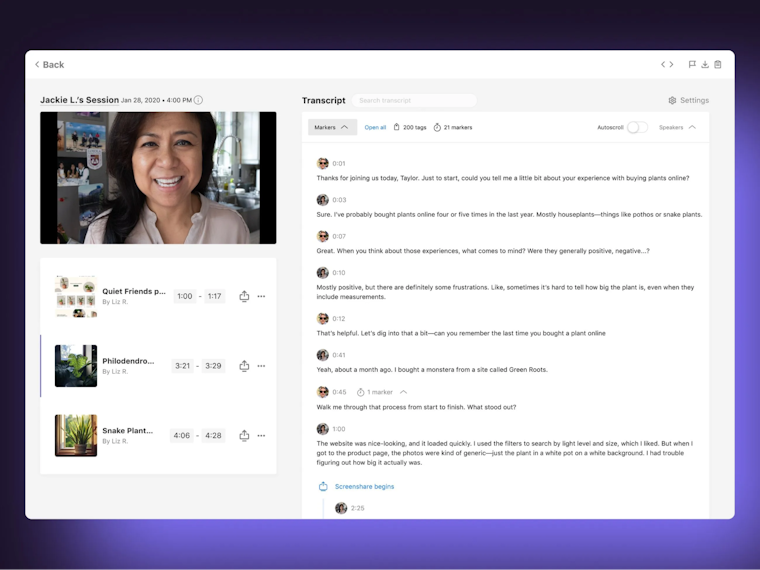
Dscout is a user research platform that handles the full workflow for 1:1 user interviews through its Live mission type. You can recruit from its scout panel or bring your own users, then let the platform handle scheduling, time zones, reminders, and pre-session tech checks.
You can run moderated video calls, with support for mobile interviews, where you see both the participant’s face and their screen. Stakeholders can join as invisible observers and use a private backchannel to suggest follow-up questions without disrupting the conversation. You get automatic transcripts, searchable timelines, clips, and AI summaries across multiple interviews.
Key features
- Incentive management: Handle participant incentives directly in-platform instead of manually sending gift cards or payments
- Session limits and scope: Live is optimized for 1:1 interviews rather than group sessions or workshops, which keeps the experience focused but may require another tool for focus groups
- Link with diary studies: Combine Live interviews with Dscout’s diary/longitudinal missions to follow up with the same participants over time
Pricing
Dscout doesn’t publicly publish its pricing plans. Based on buyer reports, individual projects are said to start around $3,000 each, with annual subscriptions averaging just over $60,000/year, and Enterprise plans reportedly starting around $75,000/year. In practice, that makes Dscout a better fit for mid-to-large companies with dedicated research budgets.
7. Lyssna (formerly UsabilityHub)

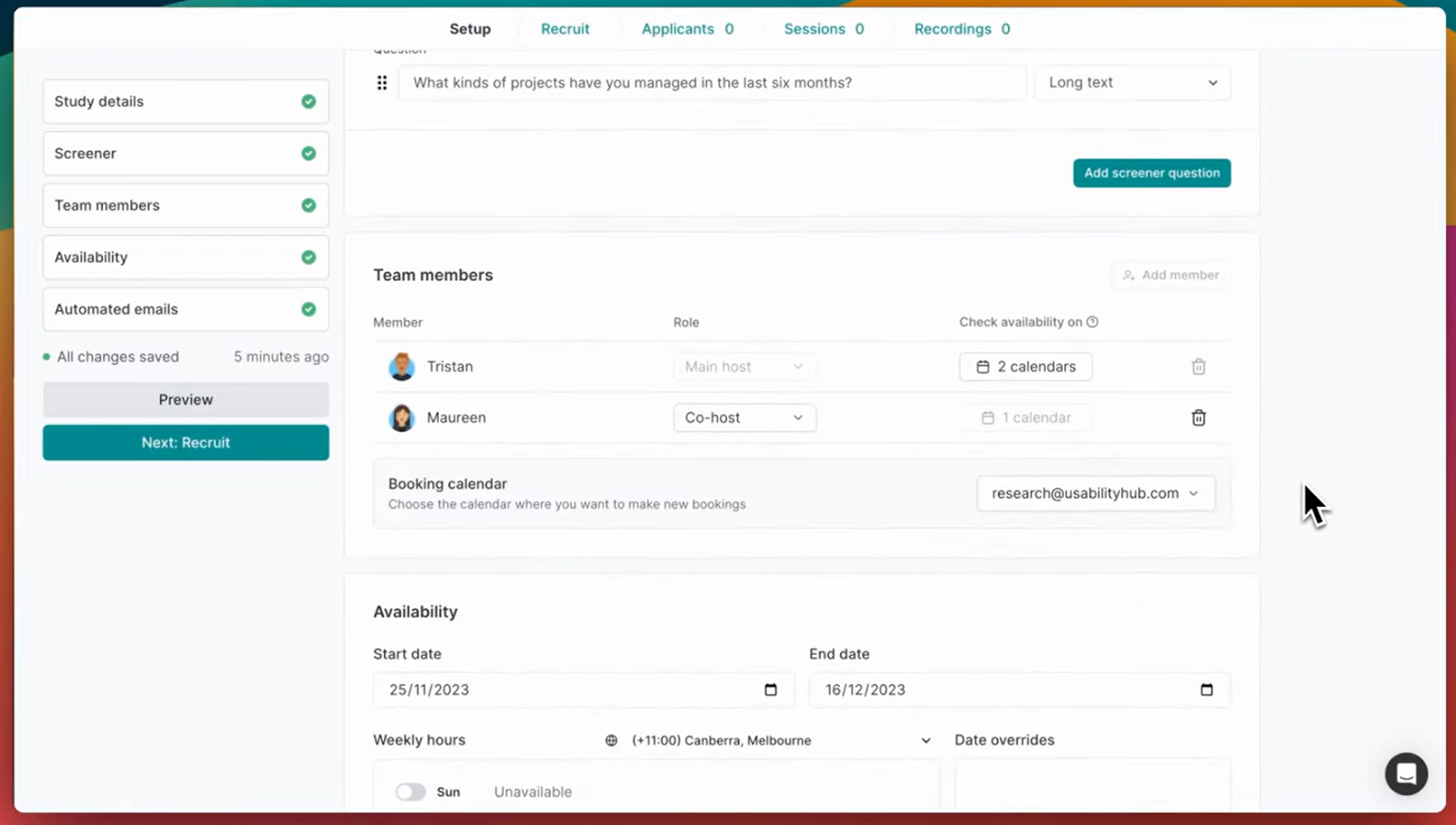
Lyssna supports moderated user interviews by combining participant recruitment, scheduling, and analysis in one workflow. You can recruit participants from Lyssna’s panel using detailed demographics and screener questions or invite your own target audience.
The tool integrates with Google Calendar to schedule sessions and send reminders automatically, then generates Zoom, Google Meet, or Teams links so you can conduct interviews. After each research session, Lyssna extracts the recording and uses AI tools for transcription and search, turning user interviews into actionable insights.
Features
- Qualify participants: Recruit from a participant database and qualify testers based on attributes like age, location, and job role
- Schedule & manage sessions: Sync calendars to find the available timeslots for participants
- Automate reminders: Send reminders and follow-up messages to participants
- Easy tracking with a dashboard: View of all participant data and activities on a single dashboard to map progress
Pricing
Free | Starter | Growth | Enterprise |
|---|---|---|---|
$0/month | $83/month | $166/month | Custom pricing |
- 1 study per month - 3 seats - 15 self-recruited responses - Core methodologies - Interviews - Live chat support - GDPR compliant - Section groups & randomization - Spaces | - 1 study per month - 5 seats - Unlimited self-recruited responses Everything in Free, plus: - AI follow-up questions - CSV exports - Custom welcome & thank-you messages - Interview co-hosts - Live website testing - Recordings - Variation sets - Conditional logic | - 3 studies per month - 15 seats - Unlimited self-recruited responses Everything in Starter, plus: - AI-generated summaries - Custom variables - Recruitment limits - Role-based permissions - Test redirects | - Custom - Unlimited seats - Unlimited self-recruited responses Everything in Growth, plus: - Agreements - Closed Spaces - Custom branding - Custom contract terms - Password rules - Priority support - Security audit assistance - SOC 2 report - Single Sign-On (SSO) - Wallets |
8. Albus Research

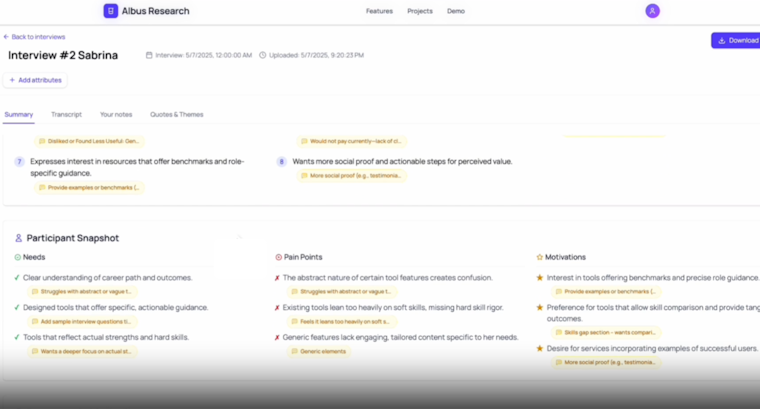
Albus Research is a user interview tool that helps with the analysis stage of user interviews, not the interviewing itself. You record sessions in tools like Zoom or Meet, generate transcripts or structured notes, and then import that text into Albus. The platform uses AI to summarize each interview, group similar quotes into themes, and organize findings into a clear structure you can turn into a report.
Key features
- Summarize interviews: Generate concise summaries for each user interview from uploaded transcripts or notes
- Group themes: Cluster similar quotes and comments into themes so you can see patterns across multiple research sessions
- Create stakeholder-ready reports: Turn themes and evidence into structured reports and executive summaries you can share with your team
Pricing
Starter | Pro | Team |
|---|---|---|
$29/month | $49/month | $59/user/month |
- 20 transcripts per month - AI-powered theme extraction - Interview summaries - Basic quote clustering - Export to PDF/Word - Email support | Everything in Starter, plus: - Unlimited transcripts and projects - Advanced AI insights - Custom report generation - Advanced analytics - Priority email support | Everything in Pro, plus: - Unlimited transcripts (with team features) - Team collaboration - Reusable tag libraries - Report templates - Admin dashboard - Dedicated support |
9. Hubble

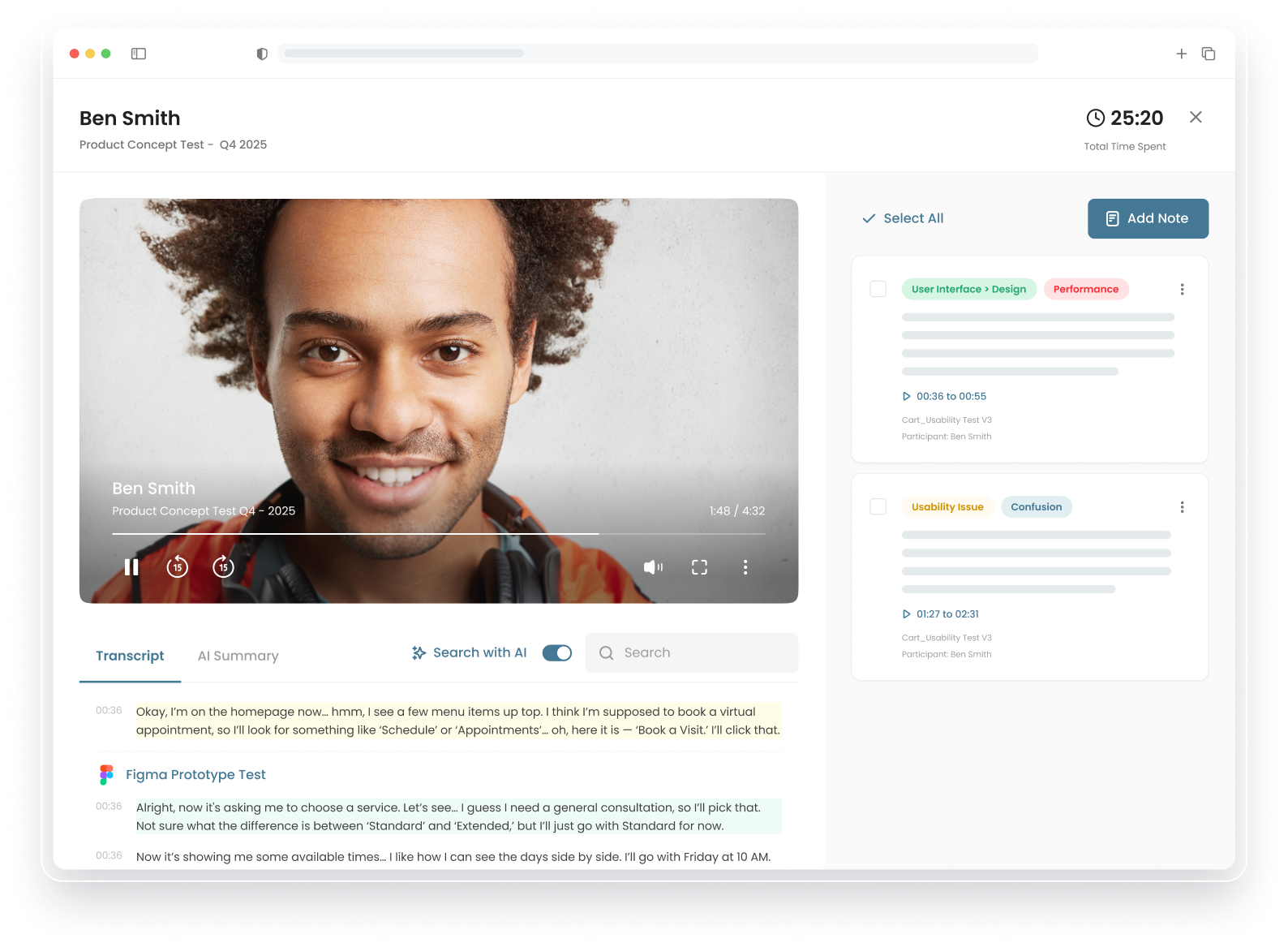
Hubble lets you design AI discussion guides for an AI moderator to run interviews, ask follow-up questions, and collect qualitative data. For live, moderated research sessions, Hubble handles scheduling sessions, confirmations, reminders, and recording. It connects to external participant panels for recruitment, uses screeners to qualify people by demographics and role, and automates incentives after each session.
Key features
- Run AI-moderated interviews: Set up AI discussion guides that lead interviews, ask follow-up questions, and collect qualitative feedback without a human moderator
- Recruit and qualify participants: Connect to external panels, use screener surveys, and filter by demographics, job role, or behavior to reach the right participants
- Analyze interview data with AI: Transcribe recordings, generate interview summaries, tag recurring themes and sentiments, and create video highlight reels for stakeholders
Pricing
Free | Enterprise |
|---|---|
$0/month | Custom pricing |
- Single seat - 10 responses per month - 1 prototype per study - AI study generation - AI rephrasing - Figma integration - Research templates | - Custom responses - Moderated studies - Custom templates - Unlimited AI reports - Customized NDA - Study randomization - Access to User Interviews participants - Access to Respondent participants - Okta or Microsoft Enterprise SAML SSO - Role-based access control - Access to SOC 2 Type II report and other security docs |
How to select the right user research tool for your UX interviews
The user research tool you choose should help you connect product promises to what your team does day to day, like recruiting participants, scheduling sessions, and turning interviews into actionable insights.
Use the criteria below to compare tools based on how well they support your current research workflow and where you want it to be in the next 6–12 months:
- Start by outlining your unique needs
- Consider AI requirements now and in the future
- Prioritize user-friendly solutions
- Don’t forget support options
- Choose a holistic solution for user experience research
1. Start by outlining your unique needs
Before you start evaluating multiple options, you need to scope out your needs for user interview studies. Who you want to interview (participant profile and key demographics), how many participants you need, and whether you’ll recruit your own users or need access to a panel. Decide if you want to automate scheduling across time zones or can manage this manually, and whether you need more than simple recordings—for example, automatic transcription, sentiment, or thematic analysis.
You also want to factor in your budget and decide how much you can spend on this tool. If you’re on a tight budget, you can prioritize your needs and choose tools offering limited features—like a tool to automate scheduling and conducting interviews. However, if you have the budget, you can pick an all-in-one tool to manage your entire user interview workflow.
💡 Not sure how many users to interview?
Use our handy sample size calculator to find the perfect number.
2. Consider AI requirements now and in the future
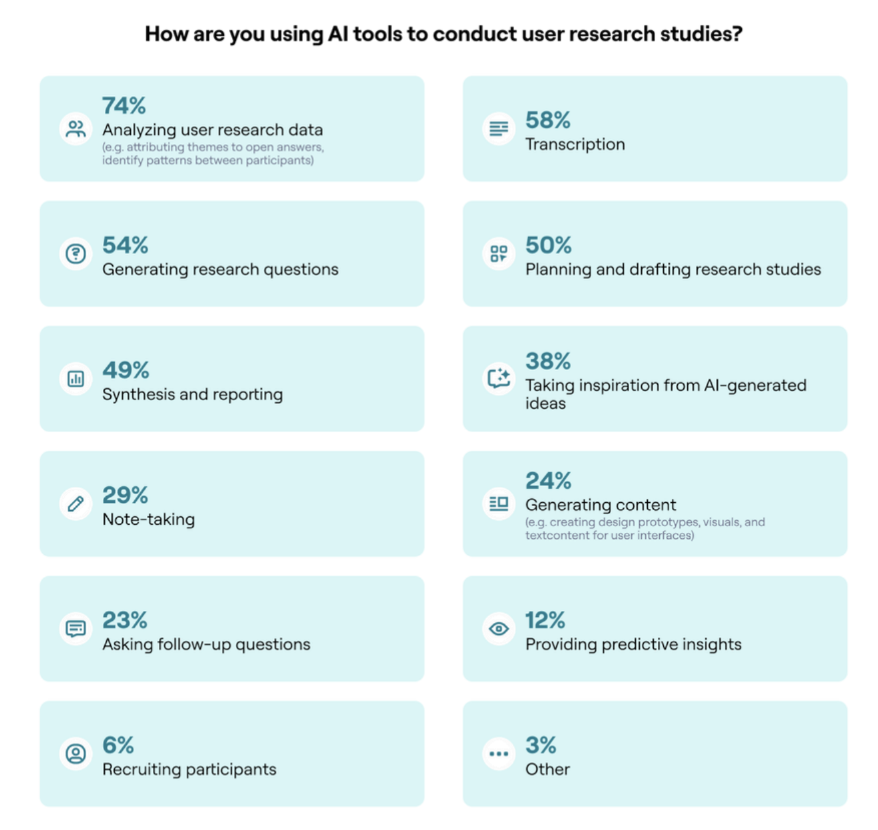
You need to be clear about what you expect AI to handle today and what you’ll need it to do as your research practice matures. Our 2025 Future of User Research report found that product teams already rely on AI for:
- Analyzing user research data (74%)
- Transcription (58%)
- Generating research questions (54%)
- Planning and drafting studies (50%)
- Reporting (49%)
Maze, for example, can support all of these needs. Other tools, like Albus Research, can only support some of these needs.

Next, check whether the roadmap moves into agentic behavior, AI that can connect themes across studies, flag contradictions with past work, help plan or adapt studies, or even support AI-moderated interviews. Choosing a tool that treats AI as a long-term research assistant reduces the risk of outgrowing it and having to migrate your whole research archive later.
3. Prioritize user-friendly solutions
Good user interview tools provide a minimal learning curve. The tool should be intuitive enough for product teams to create studies in minutes. You also want to consider end-users, and how easily they can understand the interface during interviews.
Features like interview scheduling, transcription, participant management, and data analysis are crucial for product teams tasked with conducting user interviews. You also want to look out for accessibility and technical stability to deliver a seamless interview experience to participants. This helps ensure that providing feedback is an enjoyable experience they’re likely to repeat.
4. Don’t forget support options
Remember to check out the different support options available, like documentation, webinars, training resources, and support chats, to get an idea of each tool’s support capabilities.
Consider looking at reviews of the tool’s support function, before deciding on a tool to avoid any blockers that can potentially derail your research process further down the line.
5. Choose a holistic solution for user experience research
Another important consideration is how quickly your chosen user interview tool can scale your research efforts. For starters, your user interview tool should support multiple research methods alongside 1:1 interviews, like card sorting, unmoderated usability testing, surveys, and more.
You should also look for integration capabilities to sync this interview tool with your existing workflows, data stack, and design tools. Advanced capabilities for permissions management, data security, and compliance are also important for scalability.
Plan, conduct, and analyze user interviews with Maze
Once you’re clear on your criteria, who you need to talk to, how often you run research, and what you expect from AI, you can map user interview platforms in this guide to specific needs. For example, Zoom gives you a stable place to host and record sessions, but it does not recruit participants, handle incentives, or analyze calls.
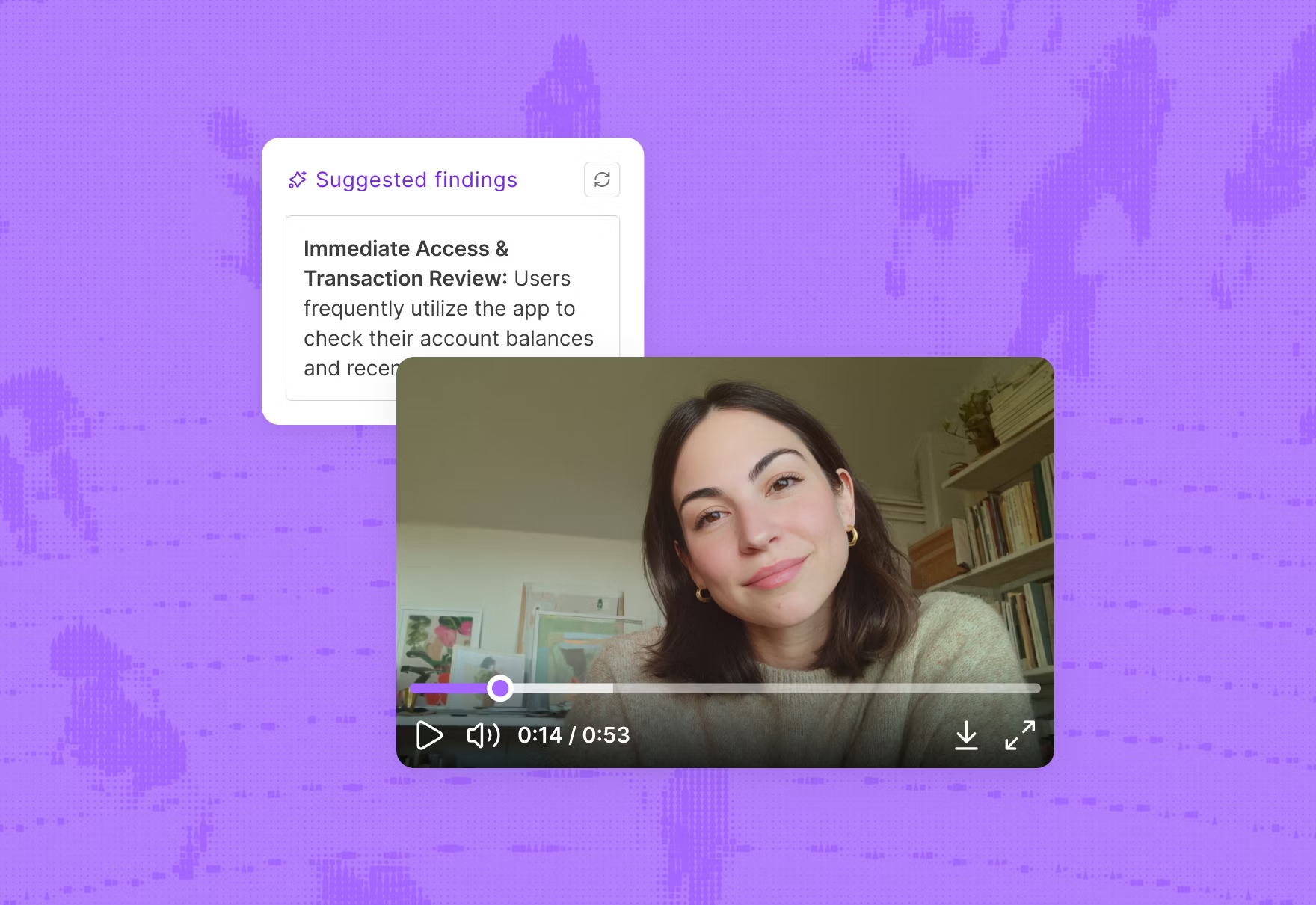
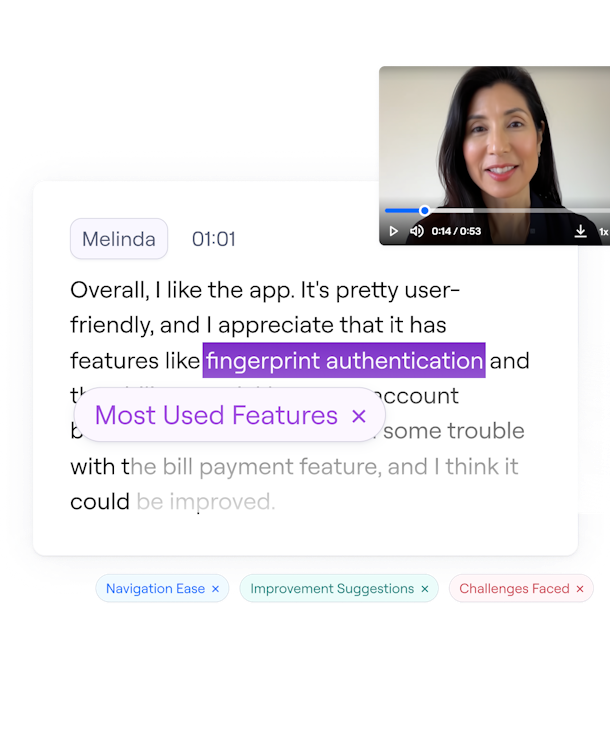
If you want user interviews to sit alongside usability tests, prototype validation, and surveys in one AI-first platform, Maze is the end-to-end solution. You can recruit participants via Maze Panel and Reach, then schedule and run interviews with the AI moderator. The AI moderator greets participants, follows your discussion guide, adapts follow-up questions based on their answers, and can run many interviews at once across time zones.


Frequently asked questions about user interview tools
Can I use generic video conferencing tools for user interviews or do I need a purpose-built research tool?
Can I use generic video conferencing tools for user interviews or do I need a purpose-built research tool?
Yes, you can—but it’s less efficient than using a user interview tool. A generic tool like Zoom for user interviews enables you to run a small number of sessions, but requires that you handle recruitment, scheduling, and note-taking yourself. The limitation is that everything lives in separate tools. Purpose-built research platforms like Lookback, Dscout, Lyssna, or Maze add structured workflows with participant recruitment, hidden observers, automatic transcription, tagging, and AI-assisted analysis.
What are the best tools for conducting user interviews in 2026?
What are the best tools for conducting user interviews in 2026?
The best tools for conducting user interviews depend on what you need. If you need a comprehensive, AI-first research platform that goes beyond interviews and helps you recruit participants, run AI-moderated sessions, test prototypes, and analyze results in one place, Maze is the best tool in this list. If you only need a tool for live moderated sessions, Lookback or Dscout can work well, and if you only need AI analysis based on your interview recordings, tools like Optimal Interviews, Albus, or Hubble are useful.
What features really matter in a user interview tool (beyond video conferencing)?
What features really matter in a user interview tool (beyond video conferencing)?
Beyond basic video conferencing, look for:
- AI-assisted analysis for themes, summaries, and clips
- Participant recruitment and screeners to reach the right users
- Automated scheduling and reminders to cut admin and no-shows
- Structured note-taking and tagging to capture observations consistently
- Hidden observers and backchannel chat to involve stakeholders without affecting the session
These are what turn “we ran some calls” into reusable, evidence-based insights. Maze combines these capabilities in one platform, so you can recruit, schedule, conduct interviews, and analyze results alongside usability tests, prototype studies, and surveys in a single workflow.
What integrations are important for user interview tools to have?
What integrations are important for user interview tools to have?
For user interview tools, the most important integrations are calendars, video platforms, and design or prototyping tools. You want to test real flows directly in session, so connections to Figma and AI-prototyping tools like Figma Make, Bolt, and Loveable are especially useful.
You also want integrations with participant recruitment platforms to reach the right audience with screeners, and with documentation or collaboration tools so transcripts, clips, and insights move straight into your existing workflow.
How can AI help with user research interviews?
How can AI help with user research interviews?
AI helps draft discussion guides, automate scheduling and reminders, and handle transcription. Some tools offer an AI moderator that runs interviews for you and adapts questions based on each answer. After interviews, AI can summarize sessions, tag themes, highlight key quotes, and make it easier to compare what people said across studies.