

















Nearly 2 in 3 researchers now use AI in at least some of their projects, leaning on it to speed up workflows and free up time for more strategic work. For research teams and product leaders, that makes AI capabilities an important decision criterion when evaluating UX research tools.
The challenge is knowing how each platform applies AI across the research workflow. Some tools focus on transcript and research summary automation. Others support study setup, AI-moderated interviews, automated analysis, reporting, and report sharing.
But it’s a challenge worth overcoming; finding the right AI-enabled research tool can be the difference between speeding up research and slowing it down.
In this buyer's guide, we dive deep into AI features in user testing tools like Maze, UserTesting, Dovetail, and Hubble to help you evaluate your shortlisted options.
TL;DR
- AI capabilities are now a key buying criteria for UX research platforms, especially for teams looking to speed up study setup, moderation, analysis, and reporting
- UserTesting fits large enterprises with extensive budgets, Dovetail fits teams analyzing existing customer data, and Hubble fits teams focused mainly on AI-led interviews
- Maze supports AI across the full research workflow, including AI study builder, AI moderator, dynamic follow-ups, thematic analysis, summaries, and reports
- Maze offers the most balanced mix of AI automation and user research, helping teams move from research question to product decision faster
How AI helps in user research
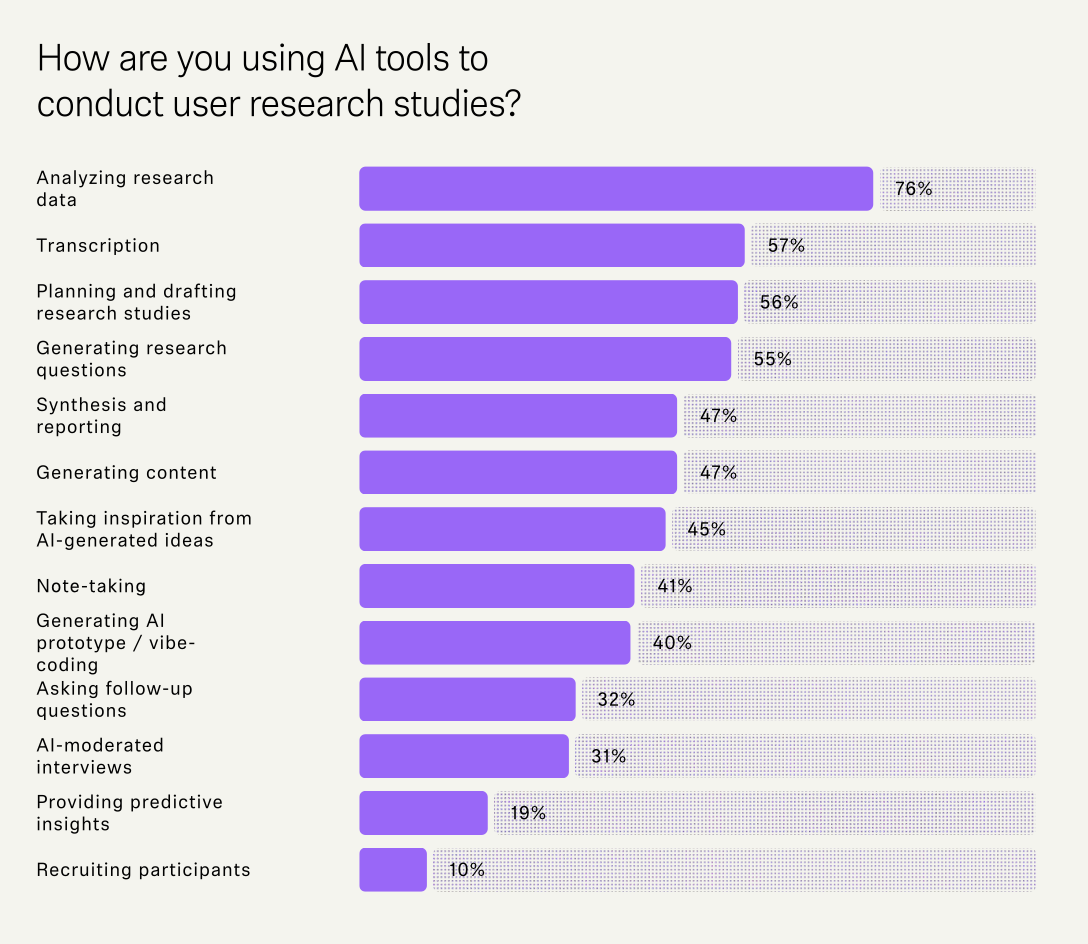
AI has fundamentally changed the pace and scope of research. According to our 2026 Future of User Research Report, researchers are already using AI to:
- Analyze data (76%)
- Automate transcription (57%)
- Plan and draft studies (56%)
- Generate research questions (55%)
And more:

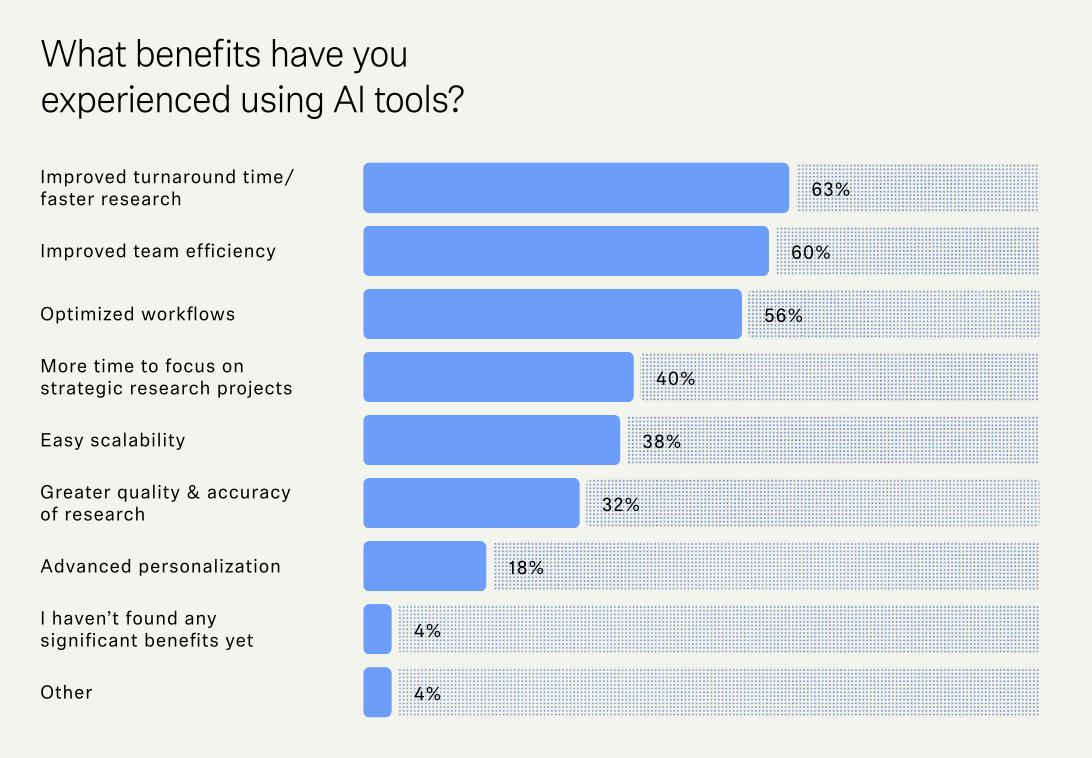
Researchers report three key benefits from adopting AI in their workflows:
- 63% say it speeds up research turnaround
- 60% report improved team efficiency
- 56% say it's optimized their workflows

But the real value is the strategic headspace AI creates. As Dalia El-Shimy, Director of User Research at Wise, puts it:
The most immediate application for AI has been replacing the repetitive parts of research execution. But we've always known that just executing research has never been enough to be a successful researcher: you need to be able to think strategically and influence direction alongside the execution.


Dalia El-Shimy
Director of User Research, Wise
Share
Researchers are now expected to influence product strategy, connect insights to business outcomes, and operate as strategic partners across the organization. AI handles the throughput.
That said, acceleration comes with responsibility. AI handles repetitive work, like transcription, data processing, and pattern recognition. Human researchers do what AI can't, which includes making ethical calls and connecting insights to business decisions.
73% of participants flag human review as a key challenge when using AI, and 80% have embedded human review of AI-generated outputs as a core guardrail in their workflows. The best results come from combining humans and AI in user research.

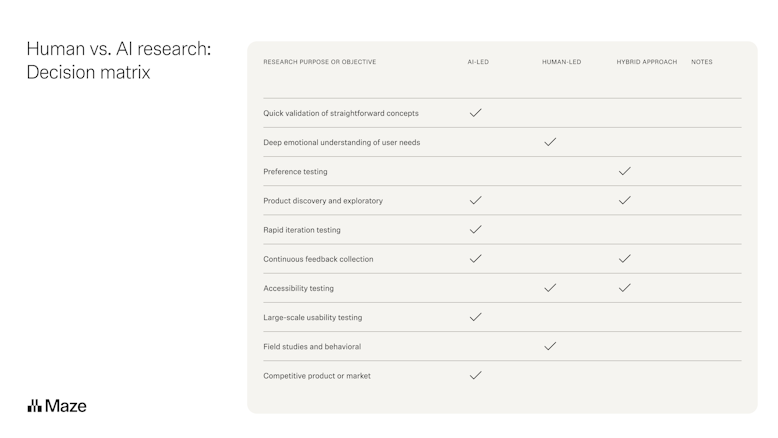
With that in mind, let’s compare the AI features of leading UX research platforms and where each one gives teams both speed and human control.
AI capabilities: Maze vs. UserTesting vs. Dovetail vs. Hubble
Before we dive into each tool one by one, here’s an overview of how the four user research platforms compare on AI capabilities:
Maze: AI capabilities
Maze is an AI-first, end-to-end user research platform built to bring every method, team, and stage of research together in one place. Maze AI is embedded across the workflow, helping teams design studies, run interviews, analyze data, and share insights faster. Its research-grade AI is built to avoid leading questions, reduce bias, stay grounded in participant responses, and evaluate conversations against 25 quality metrics.

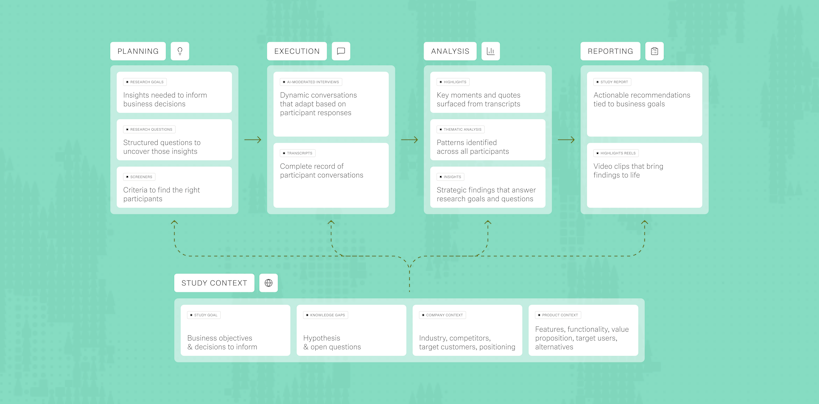
Key AI features
- AI moderator: The AI moderator runs interviews, asks real-time follow-ups, and adapts to participant responses based on your research goals
- AI study builder: Turns a plain-language research goal into a draft study, including methodology, questions, blocks, and settings
- AI question bias checker: Reviews study questions to ensure researchers avoid cognitive bias, leading language, jargon, and clarity issues before launch
- Dynamic AI follow-ups: Asks contextual follow-up questions in unmoderated studies and surveys, based on each participant’s answer
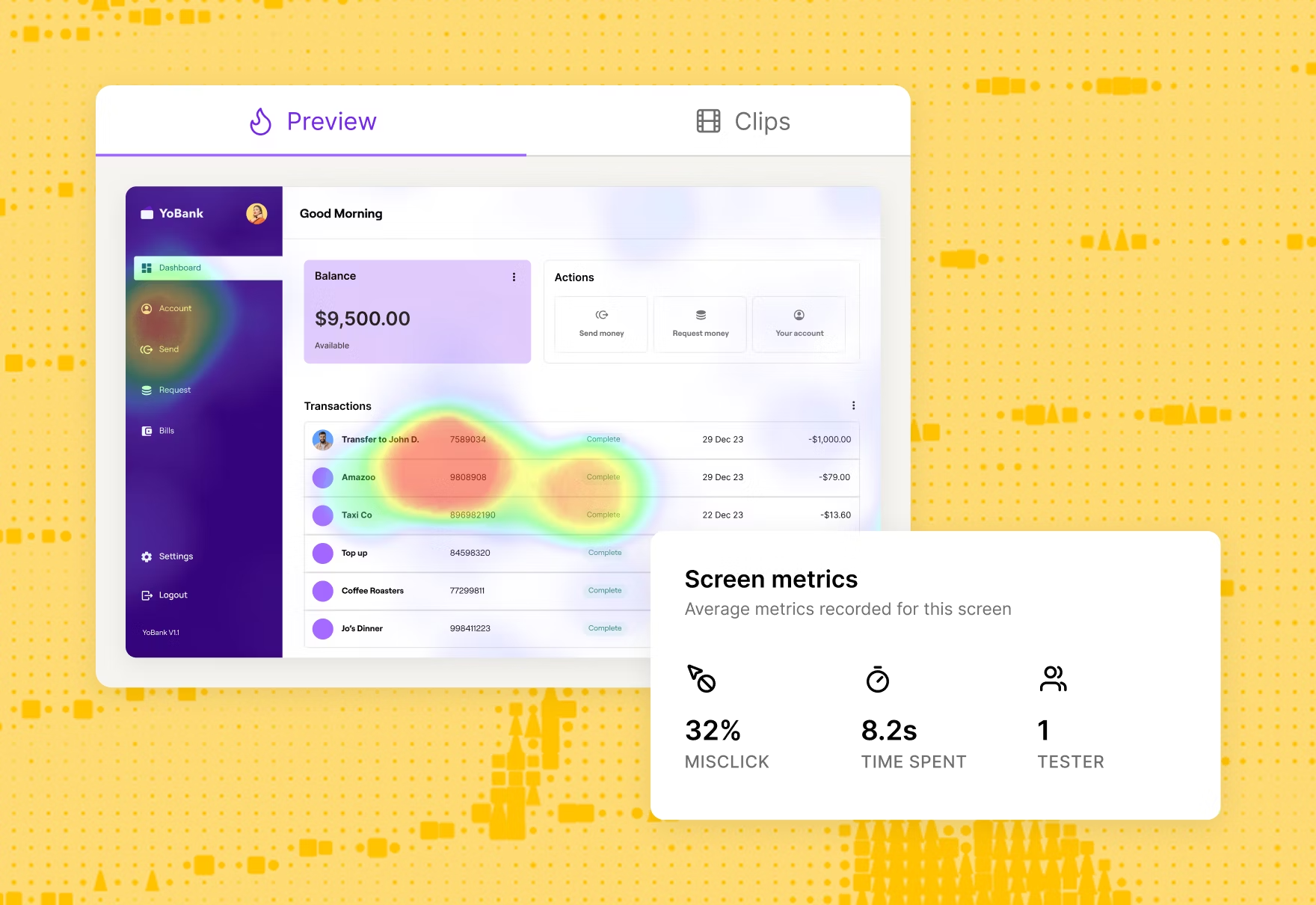
- AI thematic analysis: Groups notes, highlights, and responses for quick thematic analysis, so teams can spot recurring patterns faster
- AI transcription and summaries: Transcribes sessions, summarizes key points, and maps highlights back to research goals
- Auto-generated reports and highlight reels: Creates auto-generated shareable reports with findings, themes, and participant clips that teams can edit before sharing to enable decision-making and win stakeholder buy-in

Use cases AI supports
- Run user interviews around the clock: Maze's AI moderator conducts interviews 24/7, so researchers can recruit and interview globally without timezone constraints or scheduling conflicts. Participants get interviewed when it's convenient for them, and researchers wake up to transcribed, analyzed sessions ready for review.
- Get deeper insights from unmoderated studies: Dynamic AI follow-ups ask contextual questions based on each participant's answer, so unmoderated studies feel more conversational without constant researcher involvement.
- Analyze studies in minutes: Maze AI analysis groups highlights and responses into patterns automatically, cutting data analysis time from hours to minutes.
- Empower non-researchers to run quality studies: AI study builder and the question bias checker help PMs, designers, and anyone looking to get involved create high-quality, research-grade studies without training. Teams can scale research across the organization while maintaining quality and avoiding common pitfalls like leading questions.
Strengths and limitations
Pricing
Maze offers a Free plan and a custom Enterprise plan depending on your research needs
- Free plan: It includes one study per month, five seats, essential prototype testing, surveys, and pay-per-use panel credits.
- Enterprise plan: A custom plan built for organizations scaling user research. It includes custom study limits and unlimited seats. Teams get access to Maze panel, moderated and AI-moderated interviews, and all Maze AI features. It also includes automated analysis, presentation-ready reports, enterprise-grade security, priority support, and a dedicated CSM.
UserTesting: AI capabilities
UserTesting is a human insight platform that enables product, design, and CX teams to understand customers as they interact with products, prototypes, websites, apps, and campaigns. Its core strength is video-based usability testing that captures what people think, feel, and do in real time.
UserTesting AI analyzes video, audio, and behavioral data from these sessions to identify patterns and summarize findings faster. The platform combines live interviews, unmoderated tests, surveys, and behavioral analytics in one place.

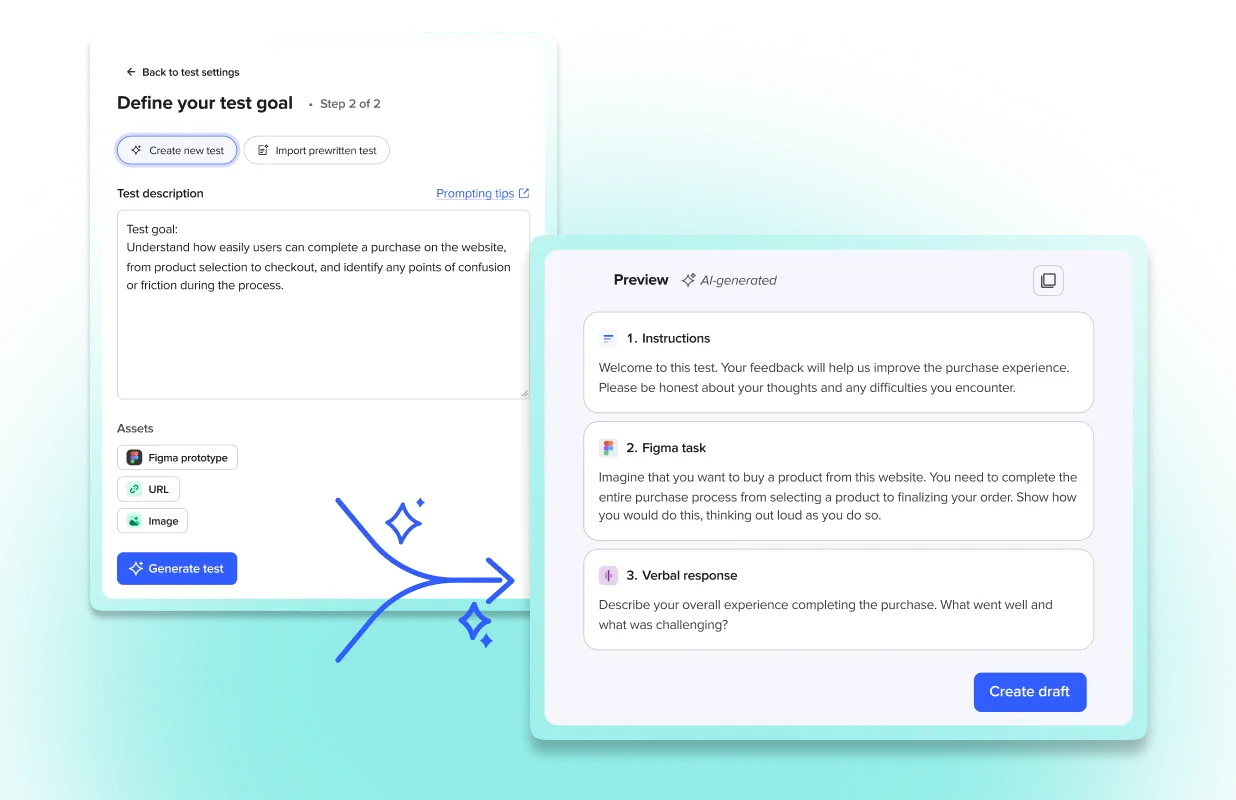
Key AI features
- AI-powered study setup: From a simple prompt, generate full test plans, participant targeting criteria, and screener questions, all editable before launch. ML-powered recommendations also flag weak screener questions before a study goes live.
- AI-powered path analysis: Sentiment path automatically evaluates positive and negative feedback as participants navigate a site or prototype, while intent path groups behaviors by goal, like browsing, searching, or adding to the cart.
- Sentiment and theme detection: ML-generated sentiment analysis identifies positive and negative moments inside the video player. Smart tags automatically surface recurring themes across sessions.
- AI insight summaries: Automatically synthesizes findings from video, transcripts, surveys, and behavioral data into a single, decision-ready output.
- Survey and review analysis: AI identifies themes from open-ended survey responses and counts how often each appears, making it easier to spot patterns in large datasets.
Use cases AI supports
- Launch quality studies without research training: AI study setup and screener question recommendations help PMs, designers, and non-researchers create sound studies.
- Analyze hours of video in minutes: AI insight summaries synthesize findings from video sessions, transcripts, and behavioral data automatically. Researchers get straight to insights without manually reviewing footage.
- Identify emotional friction points faster: Sentiment analysis pinpoints exactly where participants experience positive or negative reactions during their journey.
- Scale feedback analysis beyond small sample sizes: AI survey theme analysis processes hundreds or thousands of open-ended responses to identify patterns. Teams can analyze large-scale feedback that would be impossible to manually code.
Strengths and limitations
Pricing
UserTesting is an enterprise-grade solution with custom pricing. However, it doesn’t publish transparent pricing on its website.
Community-reported estimates from Reddit put seat-based pricing at $1,500–$2,500 per seat, with credits costing roughly $8–$10 each. An unmoderated test uses around 10 credits, while a 60-minute moderated session requires closer to 30.
Other third-party websites like Vendr indicate that annual contracts typically range from $12,000 to ~$107,000/year, with a median of around $39,870/year, while pricing for smaller teams generally starts at $15,000–$20,000/year.
💡 Not sure which platform fits your needs? Check out our Maze vs. UserTesting comparison for a breakdown of features, pricing, and use cases, as well as more on Maze vs. UserTesting AI.
Dovetail: AI capabilities
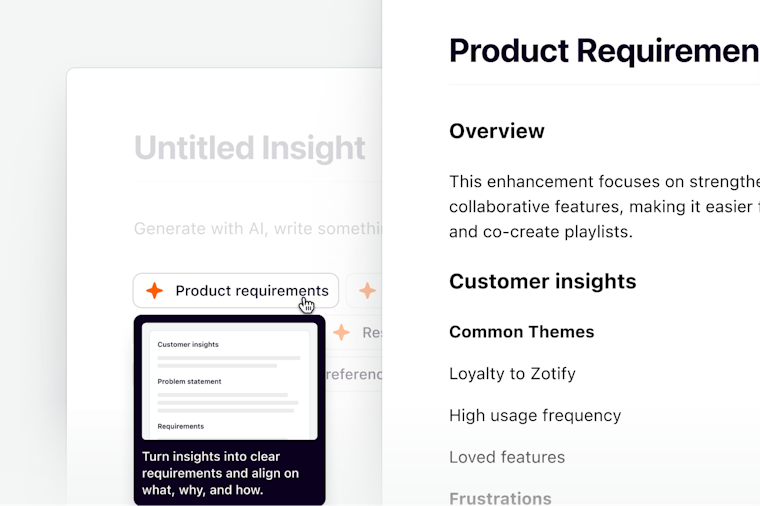
Dovetail is a customer intelligence platform that helps product, design, CX, and research teams centralize and analyze customer feedback at scale. Dovetail’s AI capabilities are useful after data has been collected, especially for turning calls, documents, surveys, support tickets, app reviews, and customer feedback into searchable themes, summaries, and reports. The platform is focused on helping teams make sense of large volumes of customer data in one place, as compared to running research studies.

Key AI features
- Conversational chatbot (powered by Claude): Let teams ask questions about customer data across a transcript, project, channel, folder, or full workspace, with answers traced back to source material.
- AI transcription and translation: Audio and video files are automatically transcribed using Amazon Transcribe and AssemblyAI, with speaker detection across 40+ languages. Transcripts and summaries can also be translated into 75 languages for global teams.
- AI summaries: Generates summaries from interviews, documents, transcripts, PDFs, reels, and customer feedback, helping teams identify key points.
- AI insight reports: Helps generate structured reports from research data using pre-defined or custom prompts.
- Channels and AI classification: Analyzes high-volume feedback from sources like support tickets, app reviews, product feedback, NPS, and CSAT, then classifies themes across large datasets.
Use cases AI supports
- Identify patterns across conversations: AI clustering groups related feedback by theme and auto-generates titles. Teams can spot emerging issues or feature requests that would take weeks to manually code.
- Answer specific questions instantly with AI chat: Teams can ask questions like "What are the top customer frustrations?" and get AI-generated answers with citations. No need to manually review transcripts.
- Turn insights into action faster: AI Docs automatically generate PRDs, Voice of Customer reports, and strategy documents from aggregated feedback. Teams move from insight to execution without starting from scratch.
- Connect feedback to business metrics: Dovetail enriches customer feedback with Salesforce data like ARR, plan type, or churn risk. Teams can segment insights by revenue impact and prioritize what matters most.
Strengths and limitations
Pricing
- Free plan: Ideal for individuals working with calls, documents, and surveys. It includes one channel, one project, Chat, and AI summaries.
- Enterprise plan: A custom plan built for organizations scaling research across teams. It includes unlimited channels, projects, docs, viewers, Chat queries, dashboards, advanced AI features, redaction, compliance, access controls, priority support, and dedicated customer success.
💡 Which platform is right for you? Check out our detailed comparison of Maze vs. Dovetail to see how they stack up.
Hubble: AI capabilities
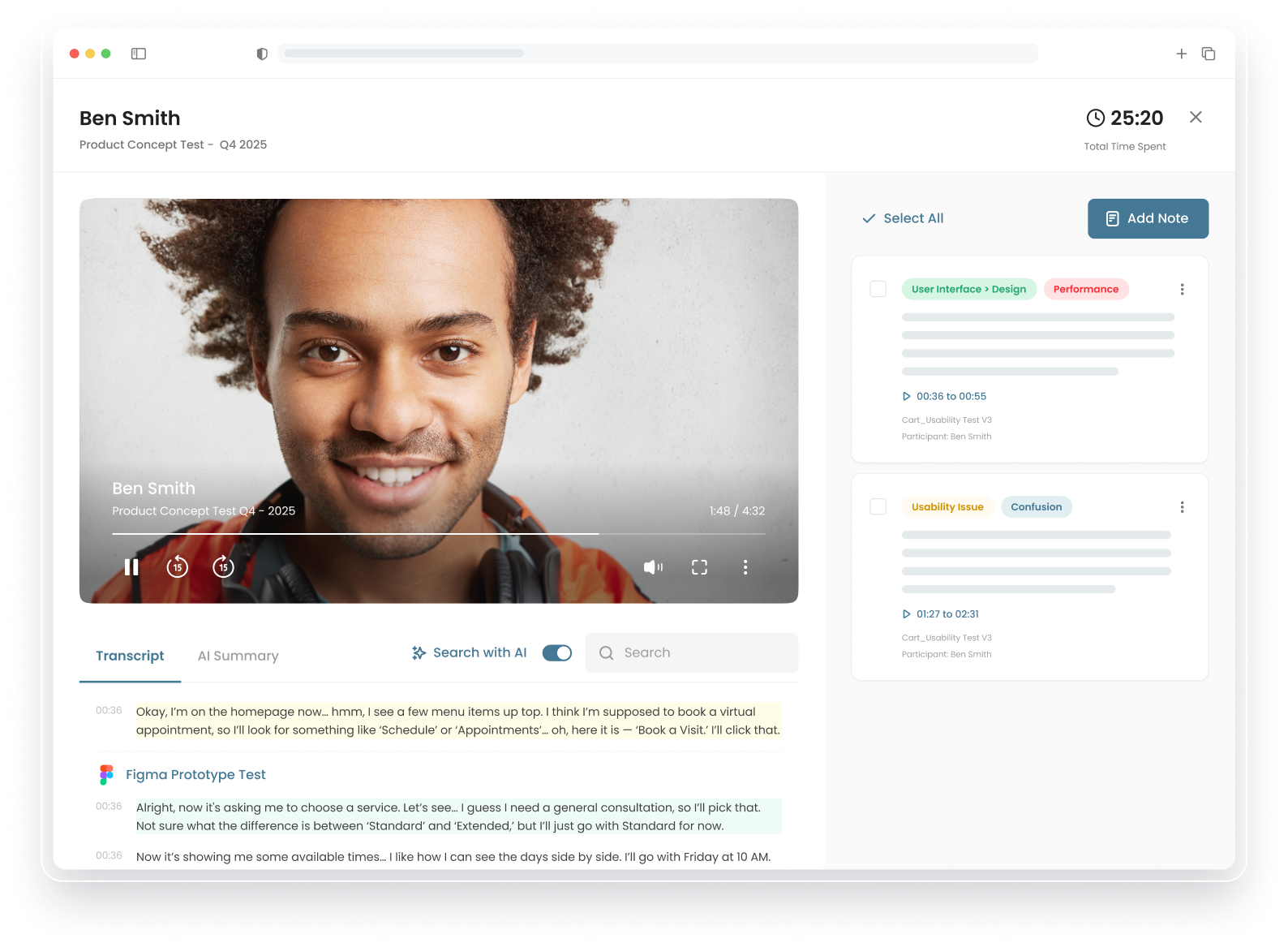
Hubble is an enterprise user research platform that specializes in unmoderated research and AI-moderated qualitative interviews. Hubble applies AI primarily in unmoderated research workflows, focusing on conducting conversational studies and accelerating analysis. Its core AI capability is the AI-moderated interviews. Hubble also supports AI across study setup, analysis, and external integrations, including connecting research data to tools like ChatGPT and Claude for deeper querying.
Compared to other platforms, Hubble’s AI focuses on running qualitative interviews and generating insights from them, rather than covering the full research lifecycle end-to-end.

Key features
- AI-powered interview: Runs conversational, AI-moderated interviews that ask follow-up questions based on participant responses and study context
- Discussion guide control: Uses high-level or detailed instructions to guide AI interviews, balancing structure with natural conversation flow
- AI study generator: Creates studies from scratch using prompts, including tasks and structure, to reduce setup time
- AI-assisted analysis and insights: Generates summaries and key findings from study results, helping teams move faster from data to insights
- AI transcription and summaries: Automatically transcribes sessions and produces summaries for faster review of participant feedback
- LLM integrations (ChatGPT and Claude): Connects Hubble data to external AI tools, allowing teams to query and analyze research content using their preferred models
Use cases AI supports
- Run qualitative interviews at scale: AI-moderated interviews capture rich voice and video responses automatically. Teams get the depth of moderated research with the scalability of surveys.
- Adapt interview questions based on responses: The AI moderator follows up on participant answers in real time, probing deeper when needed. Teams get conversational depth without scheduling live sessions.
- Choose how participants interact with AI: Hubble offers free-flowing conversation mode or push-to-talk structured responses. Researchers can pick the format that matches their study goals.
- Query research data with external AI tools: Hubble integrates with ChatGPT and Claude, letting teams ask complex questions across their research library. Researchers can explore data beyond what's built into the platform.
Strengths and limitations
Pricing
- Free plan: Includes one seat, 10 responses per month, one prototype per study, AI Study Generation, AI Rephrasing, Figma integration, and research templates.
- Enterprise plan: Custom pricing for scaling research teams. Adds moderated studies, unlimited AI reports, custom limits, participant panels, SSO, and advanced security.
How Maze AI stands out
Maze brings study setup, AI moderation, prototype and usability testing, analysis, and reporting into one connected workflow.
- AI across the full workflow: Maze applies AI across study setup, moderation, testing, analysis, and reporting. When comparing Maze with Dovetail, Dovetail’s AI primarily helps teams analyze and reuse existing research data, whereas Maze supports the entire path from study creation to finding sharing.
- Faster speed-to-insight: Maze helps teams move from research goal to study, participant feedback, analysis, and report faster. This is especially useful for teams validating concepts, prototypes, and user flows under tight product timelines.
- Accessible for product and design teams: When comparing Maze with UserTesting, UserTesting is positioned around large enterprise programs. Maze is easier to adopt across research, product, and design teams because AI supports both expert researchers and non-researchers. Features like AI study builder and the question bias checker help more teams run higher-quality studies without lowering research standards.
- Research-grade AI with human control: Maze’s AI is designed for research tasks, with guardrails around leading questions, participant meaning, and unsupported interpretation. Researchers can review, edit, and validate outputs before insights are shared.
AI moderator by Maze
Maze’s AI moderator is built for teams that need qualitative insights faster, without losing structure, traceability, or researcher oversight. Teams can run AI-moderated conversations in parallel across time zones and languages, then move directly into analysis and reporting inside the same platform.
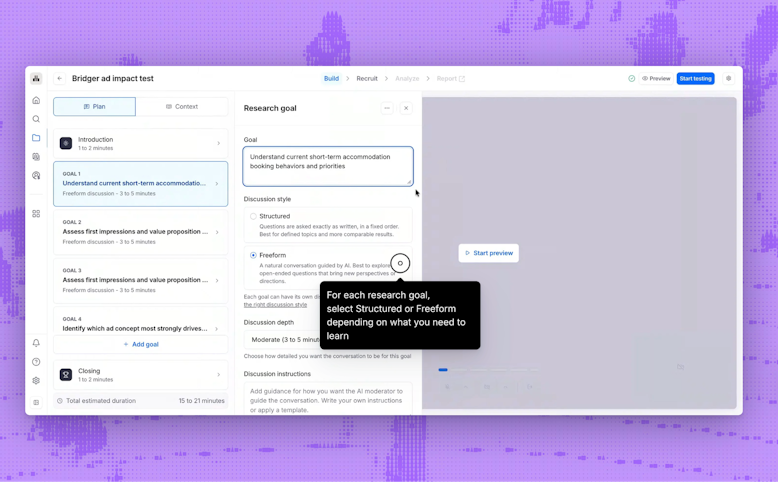
The workflow starts with research goals. Researchers define what they want to learn, and Maze automatically drafts the interview guide. Teams can refine goals, edit questions, control probing depth, and choose how structured the conversation should be before launch.
AI moderator supports two discussion styles:
- Freeform goals for exploratory conversations, discovery research, and first-impression testing
- Structured goals for fixed questioning and more comparable responses across participants
Teams can also combine both styles in a single study, moving from open-ended exploration into structured validation during the same session.

The biggest operational advantage is scale. The AI moderator can run interviews, making it easier to:
- Explore customer pain points early in discovery
- Validate concepts and workflows before development
- Understand adoption barriers and satisfaction issues after launch
- Run post-task reflections after usability tests
- Conduct multilingual research without separate moderation resources
Maze also keeps AI moderation connected to the rest of the research workflow. After each session, transcripts, summaries, themes, clips, and reports are generated automatically and mapped back to the original research goals.
Choose the best UX research platform with AI for scalable user research
The right AI research tool choice depends on your specific needs. For example:
- UserTesting is best for large enterprises prioritizing human video insights with participant panels and premium budgets
- Dovetail is best for centralizing and analyzing existing customer feedback from sales calls, support tickets, and reviews across your organization
- Hubble is best for running AI-moderated qualitative interviews at scale without manual moderation
- Maze is best for end-to-end research with AI embedded throughout—from study design and usability testing to AI moderation, analysis, and automated reporting in one platform
With Maze, teams can create studies, run prototype tests, conduct AI-moderated interviews, analyze findings, and generate reports all from the same platform. While Maze applies AI throughout the research process, researchers retain control over quality, interpretation, and final decisions.
That balance makes Maze especially useful for product, design, and UX teams. Smaller teams can streamline setup and automated analysis without needing a large operations layer. Larger teams can scale research across product, design, and UX functions without creating disconnected workflows between testing, synthesis, and reporting.
Maze makes research a continuous part of product development.


Frequently asked questions about AI features in user research tools
What’s the best AI tool for analyzing user interviews?
What’s the best AI tool for analyzing user interviews?
It depends on how your team works with interview data.
- Dovetail is well-suited for teams that need to organize and search large volumes of existing interview data across the organization
- UserTesting helps teams analyze video feedback through AI summaries, sentiment analysis, and behavioral signals
- Hubble is best for teams running conversational AI-moderated interviews as a standalone qualitative method
- Maze is best for teams that want interview analysis integrated into the wider research workflow, including AI moderation, thematic analysis, summaries, clips, and automated reports
What AI features to look for in a research tool?
What AI features to look for in a research tool?
You should look for AI functionalities that support the full research workflow. Useful capabilities include AI study creation, question quality checks, AI moderation, dynamic follow-ups, transcription, thematic analysis, source-linked summaries, editable reports, and human controls.
What’s the most complete AI tool for AI moderation?
What’s the most complete AI tool for AI moderation?
Maze offers one of the most complete AI moderation workflows currently available. Teams can run AI-moderated interviews with freeform or structured goals, dynamic follow-up questions, and multilingual moderation.
The platform also handles transcription, thematic analysis, summaries, clips, and reporting in the same workflow, reducing the need for separate tools after interviews are complete
How does Maze’s AI compare to UserTesting’s AI?
How does Maze’s AI compare to UserTesting’s AI?
UserTesting’s AI is built around test creation, participant feedback analysis, path flows, sentiment, summaries, and enterprise reporting. Maze AI covers more of the research workflow, including study setup, question bias checking, AI moderation, follow-ups, analysis, and reporting. Maze is a better fit for teams that want AI support before, during, and after a study.
Which AI features does Maze have?
Which AI features does Maze have?
Maze’s AI features include:
- Research-grade AI built to avoid leading questions and reduce bias
- AI moderator that runs interviews 24/7 with real-time follow-ups
- AI study builder that generates complete study drafts from research goals
- AI question bias checker that reviews questions before launch to catch leading language and clarity issues
- Dynamic AI follow-ups that ask contextual questions in unmoderated studies and surveys based on participant responses
- AI thematic analysis that groups highlights and responses into recurring patterns
- AI transcription and summaries that capture key points from sessions
- Auto-generated reports with highlight reels and shareable results