












Maze 101: Complete Guide to Maze
Learn everything you need to know about using Maze, whether you’re testing prototypes with users or gathering insights through surveys, card sorting, and more.


Chapter 1
Introduction to Maze
Welcome to Maze!
If you’re here, you’re probably trying to solve a familiar problem: getting reliable user insights without slowing your team down. Maybe your research process feels too manual, too scattered, or too hard to scale. Maybe you need a faster way to test ideas, validate decisions, and share findings people will actually act on.
Maze gives teams a faster, scalable way to run research, learn from users, and bring insights into product decisions. Whether you’re testing prototypes, collecting feedback, or building a repeatable research workflow across your team, Maze is the user research solution you need.
We’ve designed this guide to help you get up and running fast, whether you’re new to Maze or looking to sharpen your skills. You can use the table of contents to jump to a specific topic or read through the chapters to learn the platform step by step. By the end, you’ll have a clear understanding of what Maze can do, how to use its core features, and how to run better research with speed and a lot more clarity.
In this chapter, we'll cover:
- What Maze is and how it supports end-to-end user research
- The types of research questions and use cases you can run in Maze
- How to navigate your Maze workspace and key areas of the platform
- The different study types available in Maze and when to use each
What is Maze?
Maze is an AI-first end-to-end user research platform that helps Research, Product, and Marketing teams learn from real users to make confident decisions about what to build, launch, and optimize. With Maze, teams can recruit the right participants, run high-quality research and user testing, and turn customer feedback into clear, decision-ready insights across the product lifecycle—from early product discovery to post-launch validation and optimization.

What you can do with Maze
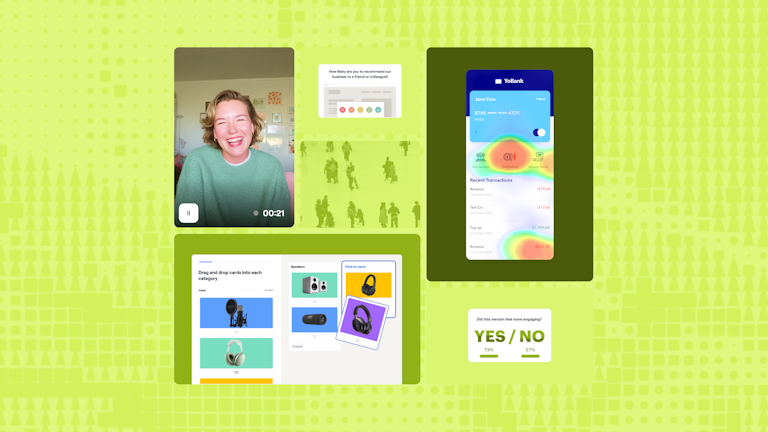
Maze is a comprehensive user research platform that provides a suite of research methods for running in-depth studies, so you can keep a continuous system of learning running alongside product development.
Whether you’re running qualitative interviews or quantitative usability studies, Maze supports every step of the UX research process—including recruiting participants, running studies, analyzing results, and sharing valuable insights with stakeholders.
With Maze AI, you can plan and automate studies, generate and refine questions, run AI‑moderated interviews, and quickly summarize findings and key themes. With Maze panel, you can recruit new participants, manage and reuse your own audiences over time, and keep feedback flowing from the right people at every stage.
Automated reports bring your quantitative and qualitative data together—success rates, paths, misclicks, heatmaps, usability scores, and themes—so you can share decision‑ready insights.
Here’s more of what you can do with Maze:
- Concept validation: Validate ideas, concepts, and value propositions with real users before you invest time and resources. Use the AI study builder to turn what you want to learn into a complete, research‑ready study in minutes, with suggested questions and structure.
- Usability and experience testing: Run task‑based tests on Figma prototypes and validate AI‑generated prototypes or live products. Combine behavioral data with follow‑up questions or interviews so you can see where people struggle and hear why in their own words.
- Message and copy testing: Compare headlines, value propositions, and in‑product copy to see what people understand quickly and what confuses them. Recruit specific segments with Maze panel so you’re validating messages with the audiences that matter most.
- User feedback and satisfaction tracking: Collect ongoing feedback and NPS to track sentiment over time and use it to guide your roadmap and prioritization.
- Interviews and discovery: Use the AI moderator or traditional interviews to explore new problems and understand user needs and opportunities. Use AI to generate follow‑up questions, capture notes, summarize conversations, and generate themes.
Maze is designed to be intuitive and collaborative, so researchers and non-researchers alike can participate. Use this guide as a practical reference to help you get the most value from Maze and turn research data into insights faster.
Getting to know your Maze workspace
When you log into Maze, you land on your home workspace. This is your starting point and central hub for running and managing all types of research. You can find quick access to recent studies, templates, and key resources to help you get started or pick up where you left off.
From here, you can create a new study from scratch or using pre-built templates, revisit drafts or live research studies, and see what your team is actively working on.

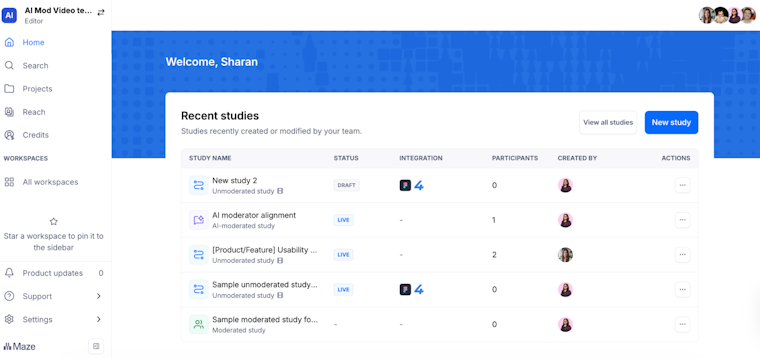
The left navigation panel is your command center. It gives you access to everything you need to run end-to-end research.
Here's what you'll find:
- Home: Access your dashboard with recent studies and quick actions
- Projects: Organize usability studies by product, team, or initiative
- Search: Find any study, project, or insight instantly
- Built-in help: Guides, Maze tutorials, support, and best practices—right when you need them
Together, these areas support the full research workflow, from setting up studies to analyzing results and collaborating with your team.
💡 First time building a Maze study? Use the AI study builder to describe what you want to learn, and Maze will draft a complete unmoderated study with the right blocks, flow, and unbiased questions ready for you to review and launch.
Building studies with Maze
In Maze, a study is a structured research experience you create for participants. It’s where you define your research goal, design the tasks or questions participants will complete, and choose how you’ll collect feedback. Maze gives you three different ways to run research, each supporting different ways of learning from users, depending on the depth, speed, and level of interaction you need.
💡 Just getting started? Watch the Intro to Maze: Product demo webinar (on-demand) for a full walkthrough—from building studies to analyzing results.
Unmoderated studies
Unmoderated studies let you collect structured feedback asynchronously, without a live researcher present. You design the study once, share it with participants, and Maze captures responses, recordings, and UX metrics automatically.
Unmoderated studies include prototype testing on Figma designs, usability tests, surveys, and live website or mobile app testing. They’re ideal for fast, repeatable research at scale.
AI-moderated studies
AI-moderated studies enable voice-led, conversational research without requiring a live facilitator. Maze’s AI moderator guides participants through questions, asks relevant follow-up questions, and captures rich qualitative feedback. This study type is well-suited for scaling interviews while maintaining depth and consistency.
Moderated studies
Moderated studies are live sessions led by a researcher. They allow for real-time interaction, probing, and adaptation based on participant responses. Moderated interviews are best for exploratory research in design processes, complex topics, or situations where deeper discussion and clarification are needed.
Up next: Set up and integrations
Next, we will walk through a simple setup to connect Maze to your product and tools, including your website and the channels where your team already collaborates. This ensures everything is in place before you run your first study, whether you are new to research or an experienced researcher who is just new to Maze.